Short answer

Here are real Data Matrix codes you can scan or download: a part number, a serial number, a web address, a GS1 product code with expiry and
lot, a rectangular code and a tiny 10 × 10. Each shows the exact data inside, and all of them are ECC 200. The code shown
here encodes PART-000123.
All samples (ZIP of SVG + PNG) What each code contains (CSV) Scanner test sheet (PDF)
Every image on this page was made by the same engine as our generator and checked by decoding it with independent software (zxing-cpp). The SVG files print at true size with 0.5 mm modules; the PNG files are 10 pixels per module, tagged 300 dpi. Want your own data instead? Make your own Data Matrix code; it takes a few seconds and no sign-up.
Everyday examples
The kinds of codes people make most. All are plain Data Matrix: the text you see is exactly what a scanner returns, character for character.
Part number
Marked on a component, a bin or a work order so a scan pulls up the right part.
- Encoded text
-
PART-000123 - Size
- 14 × 14 modules
- Data
- 11 bytes, ASCII
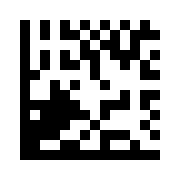
SVG prints at 9 × 9 mm including its 2-module quiet zone (code 7 × 7 mm, 0.5 mm modules); PNG is 10 px per module.

Serial number
One unique code per unit, for tracking repairs, warranty and returns.
- Encoded text
-
SN-2026-000457 - Size
- 16 × 16 modules
- Data
- 14 bytes, ASCII
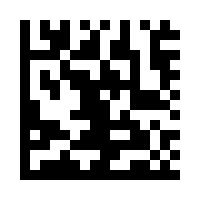
SVG prints at 10 × 10 mm including its 2-module quiet zone (code 8 × 8 mm, 0.5 mm modules); PNG is 10 px per module.

Asset tag
Laptops, tools and test equipment, scanned at check-out and during audits.
- Encoded text
-
ASSET-IT-04512 - Size
- 16 × 16 modules
- Data
- 14 bytes, ASCII
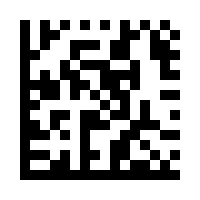
SVG prints at 10 × 10 mm including its 2-module quiet zone (code 8 × 8 mm, 0.5 mm modules); PNG is 10 px per module.

Web address (URL)
A link to a manual or a product page. Phone cameras open QR codes more reliably, so test first.
- Encoded text
-
https://example.com/p/PART-000123 - Size
- 22 × 22 modules
- Data
- 33 bytes, ASCII
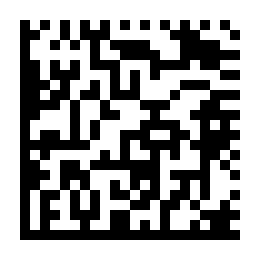
SVG prints at 13 × 13 mm including its 2-module quiet zone (code 11 × 11 mm, 0.5 mm modules); PNG is 10 px per module.

Text with accents and symbols
The en dash and € are outside Latin-1, so the whole text is stored as UTF-8 with an ECI marker that tells the scanner so. Accented letters alone (é, ö, ß) are stored as single Latin-1 bytes with no marker.
- Encoded text
-
Größe M – 5 € - Size
- 22 × 22 modules
- Data
- 19 bytes, UTF-8 with ECI 000026
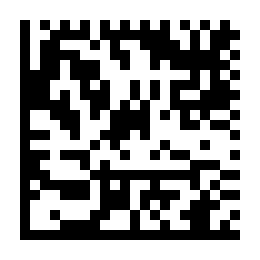
SVG prints at 13 × 13 mm including its 2-module quiet zone (code 11 × 11 mm, 0.5 mm modules); PNG is 10 px per module.

Smallest size (10 × 10)
Six digits is all the smallest square holds. Good for tiny parts.
- Encoded text
-
123456 - Size
- 10 × 10 modules
- Data
- 6 bytes, ASCII
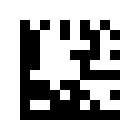
SVG prints at 7 × 7 mm including its 2-module quiet zone (code 5 × 5 mm, 0.5 mm modules); PNG is 10 px per module.
Two details to notice. The six digits in the 10 × 10 code fit because Data Matrix stores two digits per codeword; letters cost more. The web address works, but phone cameras open links from QR codes more readily; see Data Matrix vs QR code before you choose. And the accented text carries a small marker (ECI 000026) saying “this is UTF-8”, because of the – and € (accented letters alone, such as é or ö, are stored as Latin-1 bytes and need no marker). Most scanners honor it, but some older or web-based ones show the wrong characters, so test before you rely on it.
GS1 DataMatrix example
A GS1 DataMatrix is a Data Matrix whose content follows GS1 rules: it starts with an invisible FNC1 character and holds numbered fields called Application Identifiers. This one carries a product number (GTIN), an expiry date, a lot and a serial, the combination used on medicine packs.

GS1 DataMatrix: GTIN, expiry, lot and serial
The pattern used on medicine packs and medical devices: product, expiry date, batch and serial in one code.
- Printed under the code
-
(01)09506000134352(17)281231(10)LOT42(21)SN1001 - Encoded (as a scanner outputs it)
-
01095060001343521728123110LOT42<GS>21SN1001 - Size
- 22 × 22 modules
- Data
- 40 bytes, GS1 (FNC1 first)
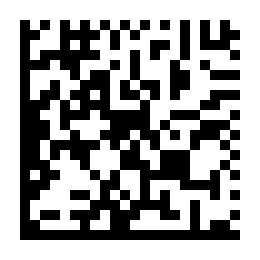
SVG prints at 13 × 13 mm including its 2-module quiet zone (code 11 × 11 mm, 0.5 mm modules); PNG is 10 px per module.
What each field means
| AI | Field | Value |
|---|---|---|
| (01) | Product number (GTIN) | 09506000134352 |
| (17) | Expiry date | 281231 31 Dec 2028 |
| (10) | Batch or lot number | LOT42 |
| (21) | Serial number | SN1001 |
The brackets in the printed line are for people and are not encoded. The lot is variable-length, so a group separator (shown as
<GS>) ends it before the serial. Scanners report this code with the prefix ]d2. Read more in
GS1 DataMatrix explained, or make one with the GS1 generator.
Size examples: 10 × 10 to 144 × 144
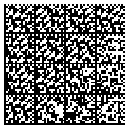
Each code below is filled to capacity with digits, the most compact kind of data, and all are drawn at the same module size, so you see their true proportions. The smallest holds 6 digits; the largest holds 3,116. Text with letters fits fewer characters.
-

10 × 10
6 digits
SVG -

16 × 16
24 digits
SVG -

24 × 24
72 digits
SVG -

32 × 32
124 digits
SVG -

48 × 48
348 digits
SVG -
64 × 64
560 digits
SVG -
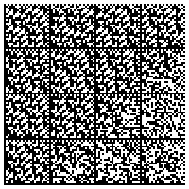
96 × 96
1,392 digits
SVG -
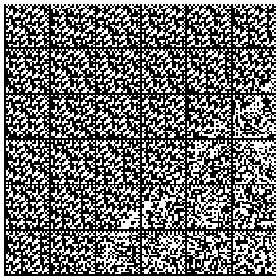
144 × 144
3,116 digits
SVG
Rectangular and DMRE examples
Data Matrix also comes in rectangles, for narrow labels and the edges of parts. ECC 200 defines 6 of them (8 × 18, 8 × 32, 12 × 26, 12 × 36, 16 × 36, 16 × 48), and because they are part of the original standard, readers support them widely. A newer standard, DMRE (Data Matrix Rectangular Extension, ISO/IEC 21471), adds 18 more, up to 26 × 64.

Rectangular (8 × 32)
The same part number as above, reshaped for a narrow label or the edge of a part.
- Encoded text
-
PART-000123 - Size
- 8 × 32 modules
- Data
- 11 bytes, ASCII
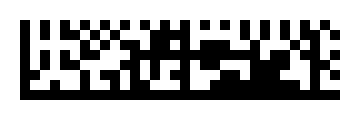
SVG prints at 18 × 6 mm including its 2-module quiet zone (code 16 × 4 mm, 0.5 mm modules); PNG is 10 px per module.

Largest standard rectangle (16 × 48)
The largest rectangle in the original ECC 200 standard, for more data on a narrow label.
- Encoded text
-
PART-000123 LOT 2611-A QTY 25 - Size
- 16 × 48 modules
- Data
- 29 bytes, ASCII
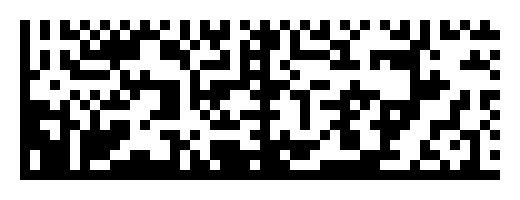
SVG prints at 26 × 10 mm including its 2-module quiet zone (code 24 × 8 mm, 0.5 mm modules); PNG is 10 px per module.

DMRE rectangle (8 × 64)
A newer extended rectangle (ISO/IEC 21471). Only 8 modules tall, but older scanners may not read it.
- Encoded text
-
PART-000123 LOT 2611 - Size
- 8 × 64 modules (DMRE)
- Data
- 20 bytes, ASCII

SVG prints at 34 × 6 mm including its 2-module quiet zone (code 32 × 4 mm, 0.5 mm modules); PNG is 10 px per module.
Before you print DMRE codes in quantity, check that every scanner that will read them supports DMRE; some older ones do not. Code T9 on the test sheet below checks exactly that. The rectangular generator labels DMRE sizes clearly.
Printable scanner test sheet
One page, 12 codes, from a 3.5 mm code to a 32 mm rectangle: five module sizes (0.25 to 1.00 mm), square, rectangle, DMRE, GS1 and UTF-8. Print it to check a new scanner, a phone app or a printer, or to show a supplier what “must read” means. It is free to copy and share.
How to use it
- Print at 100%. Measure the bar at the top: it should be 100 mm (3.94 in). If not, turn off “Fit to page” and print again.
- Scan each code, at the distance and angle you will use for real.
- Compare what the scanner returns with the expected text below. A scanner set up as a keyboard may change or drop characters, so test in the app you will actually use.
- For T10, check that the scanner sends the group separator (ASCII 29) and, if your system needs it, the
]d2prefix.
| Code | Size | Tests | Should read |
|---|---|---|---|
| T1 Part number | 14 × 14 0.50 mm modules, 7 × 7 mm | Baseline: a short code at a comfortable size. | PART-000123 |
| T2 Part number, smaller | 14 × 14 0.33 mm modules, 4.6 × 4.6 mm | Same data at 0.33 mm modules (13 mils). | PART-000123 |
| T3 Part number, small | 14 × 14 0.25 mm modules, 3.5 × 3.5 mm | Same data at 0.25 mm modules (about 10 mils): needs a sharp imager and a good print. | PART-000123 |
| T4 Smallest size | 10 × 10 0.50 mm modules, 5 × 5 mm | The 10 × 10 symbol. | 123456 |
| T5 Web address | 22 × 22 0.50 mm modules, 11 × 11 mm | Lowercase text and punctuation. | https://example.com/p/PART-000123 |
| T6 Full 32 × 32 | 32 × 32 0.40 mm modules, 12.8 × 12.8 mm | Four data regions, filled to capacity with digits. | 0123456789012345678901234567890123456789012345678901234567890123456789012345678901234567890123456789012345678901234567890123 |
| T7 Rectangle | 8 × 32 0.50 mm modules, 16 × 4 mm | A standard rectangular size. | PART-000123 |
| T8 Large rectangle | 16 × 48 0.50 mm modules, 24 × 8 mm | The largest standard rectangle. | PART-000123 LOT 2611-A QTY 25 |
| T9 DMRE rectangle | 8 × 64 DMRE 0.50 mm modules, 32 × 4 mm | An ISO/IEC 21471 size. A no-read here means your scanner lacks DMRE support. | PART-000123 LOT 2611 |
| T10 GS1 DataMatrix | 22 × 22 0.50 mm modules, 11 × 11 mm | FNC1 and a group separator. Check the GS character arrives and the scanner reports ]d2. | 01095060001343521728123110LOT42<GS>21SN1001 |
| T11 UTF-8 with ECI | 22 × 22 0.50 mm modules, 11 × 11 mm | Accents and the euro sign. Wrong characters mean the scanner ignores the ECI marker. | Größe M – 5 € |
| T12 Part number, large | 14 × 14 1.00 mm modules, 14 × 14 mm | Same data at 1 mm modules, for long range or low-resolution cameras. | PART-000123 |
The same text, with the exact bytes in hex, is in the CSV (one row per sample). A code that decodes here proves the symbol is correct, not that a printed copy is good enough: grading print quality takes an ISO/IEC 15415 verifier. Need your own codes on labels? Print labels on sheets or thermal rolls.
Data Matrix icon (decorative)
Need a Data Matrix symbol for a button, a menu or a slide? This SVG icon uses currentColor, so it takes the color of the text
around it. It is a real 10 × 10 code that encodes just “DM”, so it never points anywhere, but it is meant as a picture, not for scanning.
Free to use under CC0.

Generated with engine v2.0.1. To check any of these codes yourself, save one and decode a sample in the reader; nothing is uploaded.